
Arcade
Pixel Dash: Neon Run
Want a one-button run? Tap to clear a spike, then tap again in midair to reach the next coin.
Jump over neon spikes, steer a starfighter or serve a volleyball straight from your browser. No download needed.
Featured game
Pixel Dash
Neon Run
Double-jump over obstacles and collect coins in a neon pixel city.
Play Pixel Dash6 games
Arcade
Want a one-button run? Tap to clear a spike, then tap again in midair to reach the next coin.

Arcade
Watch for the first ship to break formation. Slip past its dive and line up a shot before the boss arrives.

Sports
For a game of timing, wait for the ring to turn green. Pick your hitter and tap to finish the rally with a spike.
Arcade
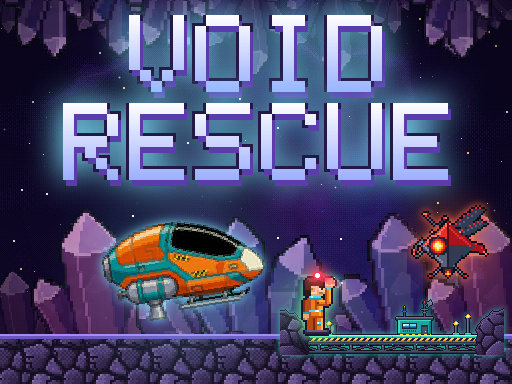
Prefer a careful landing? Feather the thrust beside a stranded survivor, then fly them home before your fuel runs out.
Arcade
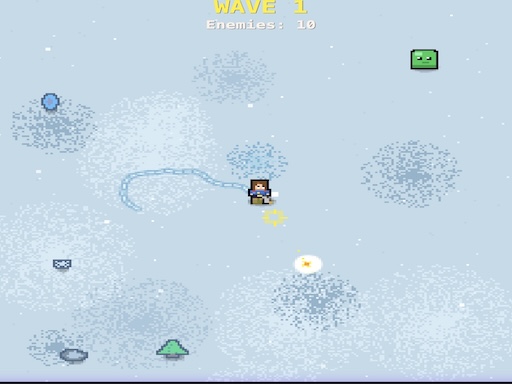
Steer through gaps in a swarm of bats and slimes. Pick an attack upgrade that gives you room to turn when the next wave closes in.

Racing
Race the checkpoint clock in a truck. Brake before a bend and save your nitro for a straight where you can pass.
Pixel Break is a collection of free pixel games you can play in your browser. The artwork is built around visible pixels, from the lit windows behind a runner to the outlines of ships on a dark playfield. Clear silhouettes make it easier to spot a spike, a rival or a safe landing area while you play. Pick a game by its controls and pace as well as its cover. A one-button run is easy to start over, while a rescue mission or a volleyball match gives you a more deliberate goal.
Start with Pixel Dash: Neon Run if you want a game with one main action. The runner moves on its own, so your job is to time jumps over obstacles. Press Space or the Up Arrow, or tap to jump. A second press or tap while airborne gives you a double jump. Save it until you can see where you need to land. As the speed rises, watch the ground ahead and take a coin only when the path is clear.
Galala puts the action above you in a tall space-shooter playfield. Enemy ships form up and dive towards your starfighter. Watch the gaps between their paths before you line up a shot. Moving early gives you more space to dodge a second attack. If you prefer a game where threats approach from more directions, try Monster Haul. Move away from the crowd, choose upgrades between waves and leave room to turn when you approach the edge of the map.
In Void Rescue, you pilot a small capsule through crystal caves, land near stranded survivors and carry them back to the base. Plan the return trip before you descend. Give yourself room to slow down near the ground, and keep an eye on fuel when a survivor is far from the landing pad. Try a careful approach on your first run so you can learn how the capsule responds before making tighter turns.
Netherton Volleyball uses timing on a pixel-art court. Wait for the cue before you serve, dig or set the ball. When you choose a hitter, look at the available rings before you commit. American Truck Racing Simulator is a different kind of timing challenge. Use clear stretches to overtake or boost, then prepare for the next curve. If you are new to the controls, the Auto Gas option lets you practise steering without holding the accelerator.
Open a game card to see its controls and a short gameplay guide. Select Play game to load the game from GameMonetize. Some titles show a loading screen or an advertisement before the game menu. If the player offers a close or skip button, use it when it becomes available. You can then follow the instructions on the game's own start screen.
On desktop, click inside the player before you try a keyboard shortcut. This gives the game focus. Keep its controls handy if you switch between games, since the same key can jump in one game and perform a timed hit in another. If you are playing on a phone, look at the controls label on the game page before you start. A tall shooter or sports game can use the full height of a portrait screen, while a side-scrolling game may give you more room to see obstacles when you turn your phone sideways. Use Fullscreen if your browser supports it and the controls fit better there.
Use the search box for a title you already know or a term such as runner, volleyball or racing. Results use the game titles and descriptions, so you can find a specific style even when it only has one entry in the catalog. The game pages also link to other games you can try after a match, a race or a run.
Select the heart on a card when you find a game you want to replay. Open Favorites to find it again without searching. Favorites belong to the browser where you saved them, so use the same browser and device when you return. An individual game's score or settings are handled by its own player. If you want to share a game with someone else, use the share control on its page or send its page address. They can open that game directly and see its controls before they start.
Curious about the artwork? Explore our pixel art games guide to compare styles and controls.
Pixel games use visible pixels to draw their characters and worlds. The 2D games in this collection are free to play in a browser.
The games in the Pixel Break catalog are free to open and play. Some may show an ad before play starts or between rounds.
Look for a Touch or Keyboard and touch label near the player. A game marked Keyboard is best played on a device with a physical keyboard.
These games run in a web browser. Open a game page and select Play game to load the player without installing an app.
No. A pixel game can be brand new. Retro games borrow from older games or come from that era. Galala combines the two with pixel ships that dive in classic arcade formations.
Try Pixel Dash: Neon Run if you want to learn one move and retry quickly. Void Rescue gives you a different challenge, with time to slow down and line up a landing.
Reload the page, check your connection and JavaScript settings, and select Play game again. Each game page also links to its original GameMonetize listing.